
Priority
Rental payments
$1M–$10M across 100+ properties. Refunds as auditable reversals.
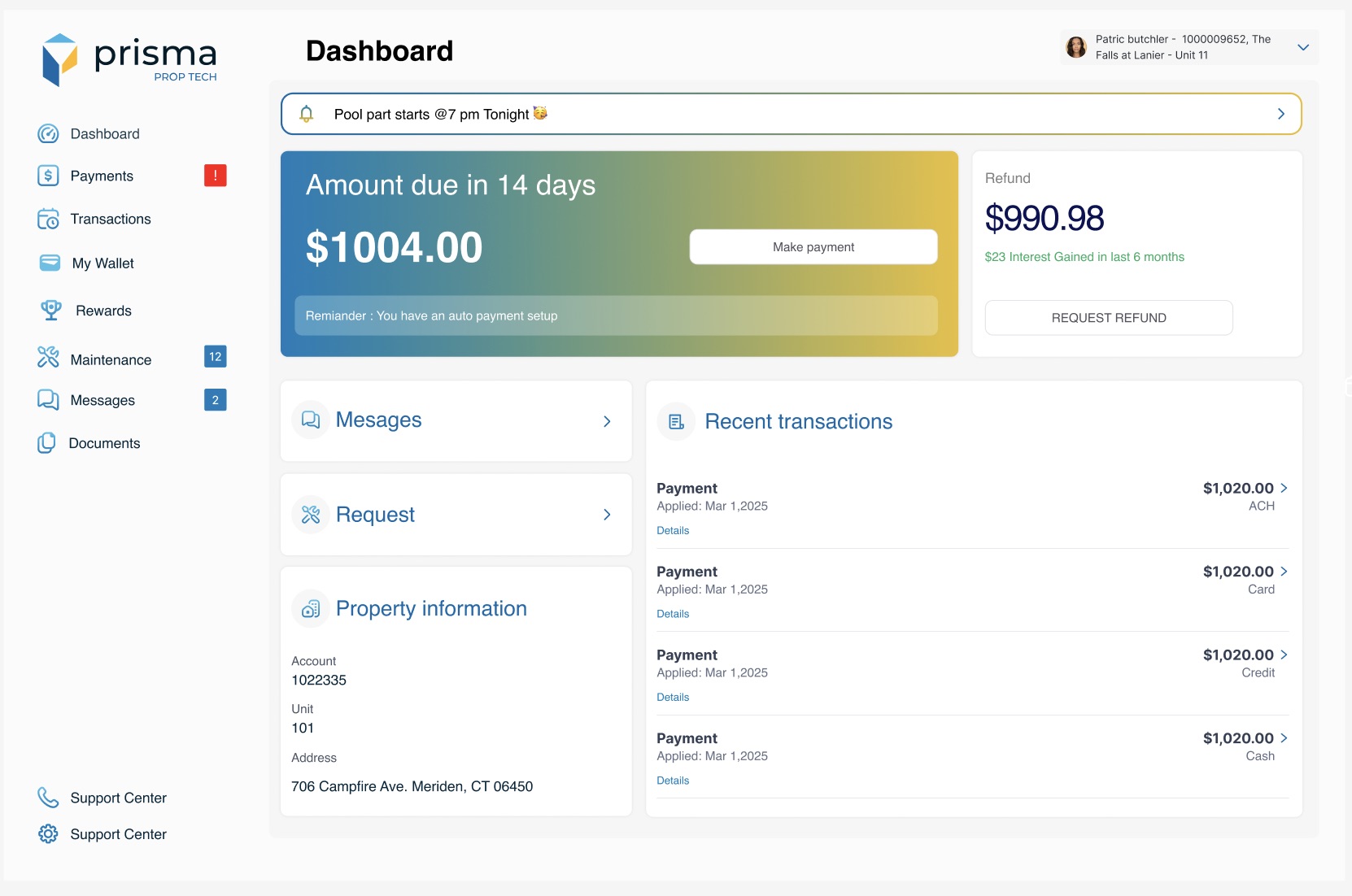
A resident portal where rent is easy to pay, maintenance is one tap away, and the security deposit earns for the resident, then comes back on time, the way they choose.
Background
Priority is a payments company. Prisma is its property-management product. Property managers use it to move $1M to $10M across 100+ properties, on a platform that handles 730 million transactions.
It serves two sides at once. Property managers collect rent and hold deposits across hundreds of units. Residents pay rent, live in the property and wait for their deposit back. Most clients still handled deposit returns by hand, while each state sets its own deadline for the refund.
The platform around it
How Prisma describes itself to property managers. The deposit work had to fit into all of this.
- 100% digital paymentsRent, fees and deposits collected and paid out in one platform, with no manual reconciliation.
- Security deposit managementPitched as “the first modern security deposit platform”: collecting, storing, managing and refunding deposits in one place.
- Pay Shield, via PlaidBank details are verified in real time during payment, so fewer payments bounce for non-sufficient funds.
- Resident portalResidents submit work orders, pay rent by ACH, credit, debit, cash or check, and contact the property.
As a payments company, Priority could offer residents more than a bill: a digital wallet backed by a real ledger, a debit card for people without a bank account, and rewards. And every payment made by card or debit supports the business.
My role
Product Design Consultant, December 2024 to March 2025, working with the product owner and the head of product.
- Audited the resident portal screen by screen, and mapped the move-out journey for both the resident and the property manager.
- Designed the security deposit experience inside the resident portal, from the first payment to the refund.
- Designed rental payment workflows for managers moving $1M to $10M across 100+ properties, so every movement traces back to its origin.
- Modeled refunds as reversals bound to their parent payment, auditable without touching the shared ledger service, and designed threshold defaults with overrides for the banking mechanics.
Creating a vision & roadmap
The brief at kickoff was clear: return security deposits in a timely way, for the resident and the property manager. On the manager's side, the pain was simple. Everything was manual, there were no reminders, and dates were often missed. The goal: digitize the manual return process and give the resident a clear report on their deposit.
Tools existed for deposit returns, and separate ones for banking. There was no resident portal in the industry that joined the two.
Two journeys to design first
-
The new resident
Starting pointNo portal account yet, and a deposit to pay.
What they needA clear request, an easy way to create the account, and the deposit paid online, not at the office.
-
The resident moving out
Starting pointHas used the portal for months and expects a full refund.
What they needTo know how much is coming back, when, and to choose how they get it.
Who lives there
Residents fall into three groups, and most of them are students.
-
Students Most residents
NeedRent is often their biggest bill, and the deposit is money they can't touch for a year or more. Some don't have a bank account.
Where it fitsInterest on the deposit and rewards on payments turn locked money into small savings. A wallet and a virtual debit card work without a bank account.
-
Couples
NeedTwo people, one rent. Who paid, how and when needs to be clear to both.
Where it fitsEvery transaction shows its method, and auto pay keeps the month from slipping.
-
Families
NeedLonger stays, more things that break, more requests to the property.
Where it fitsMaintenance and messages sit on the dashboard with a clear status, and the deposit keeps earning for as long as they stay.
Auditing what was there
Before designing, I went through the existing portal: dashboard, payments, auto pay, payment methods, history and maintenance. Each finding was tied to a principle and to its impact on the business.
| Area | What I found | Principle |
|---|---|---|
| Dashboard | No due dates on rent, renewals or inspections | Proactive reminders |
| Dashboard | No recent activity: last payment, last request | Recognition over recall |
| Make a payment | Too many CTAs at the top, and the amount not highlighted | Cognitive load |
| Make a payment | No preview before submitting | Error prevention |
| Payment history | Statuses shown as plain text only | Accessibility |
| Maintenance | Work orders have no status like “In progress” | Visibility of system status |
| Maintenance | Empty state gives no next step | User control |
| Side menu | Text contrast may miss WCAG AA | Accessibility |
Service blueprint
The blueprint follows the deposit from the first email to the refund, with the property manager's work and the payment systems underneath. The move-out side came from mapping every step both people take: notice, inspection, damage assessment, refund calculation, the refund itself and any dispute.
Priority · Prisma · Service blueprint
Renting, from deposit to refund
How a resident pays, lives and gets their deposit back through one portal: what they do, what they see, the property manager's work behind it, and the systems that make it run.
ExpectationKnow where my deposit is, and get it back on time, the way I want.
Time →
01Move in & pay the deposit
02Pay rent every month
03Live & get things fixed
04Deposit earns while you stay
05Move out & choose the refund
Resident actionsSteps the resident takes
- Open the deposit email
- Create a resident portal account
- Pay the deposit online
- See what is due and when
- Pay by ACH, card or debit
- Turn on auto pay
- Raise a maintenance request, with photos
- Follow its status
- Read property messages
- See the deposit and the interest it has gained
- Earn rewards on payments
- Give notice and a move-out date
- Choose how to get the refund: ACH, check, wallet or Priority debit card
Line of interaction
FrontstageWhat the resident sees
- Deposit request email with a portal link
- Deposit card on the dashboard
- “Amount due in 14 days”
- Auto payment reminder
- Recent transactions with the method
- Maintenance count and Request
- Status: Received → In progress → Completed
- Security deposit tab inside My Wallet
- “Interest gained in last 6 months”
- Refund amount with a breakdown of any deductions
- Refund status until it lands
Line of visibility
BackstageThe property manager's work
- Record the deposit against resident, unit and property
- Apply each payment to the right unit and period
- Threshold defaults, with overrides
- Route the request to the maintenance team
- Keep photos as evidence for any charges
- Hold the deposit in an interest-bearing account, as states require
- Add interest to the deposit over time
- Inspect, assess damage, calculate the refund
- Issue it within the state's deadline
- Book it as a reversal of the original deposit
Line of internal interaction
Support systemsShared across stages
- Resident portal
- Payments
- Auto pay
- Work orders
- Messaging
- Escrow account
- Wallet ledger (Passport)
- Shared ledger
- Debit card issuing, with KYC
Physical / digital evidenceWhat builds the resident's trust
- Deposit receipt
- Transaction list with the method
- Request status
- Inspection photos
- Interest shown on the dashboard
- Refund report with deductions
- Money in the chosen account
GoalWhat success looks like
- Pay the deposit without visiting the office
- Rent never feels like a surprise
- Getting something fixed is one tap
- The deposit visibly works for the resident
- A full refund, on time, the way the resident wants it
Risks & failure pointsWhere it can break
- Resident has no portal account yet
- Missed due dates
- No status, so people chase by phone
- The deposit feels invisible
- Refund dates missed while done by hand
- A failed ACH or an uncashed check
- Damages larger than the deposit
The opportunity
On the manager's side, deposits add up to a large balance across properties, with interest tracked on every deposit. Many states require that money to sit in an interest-bearing account.
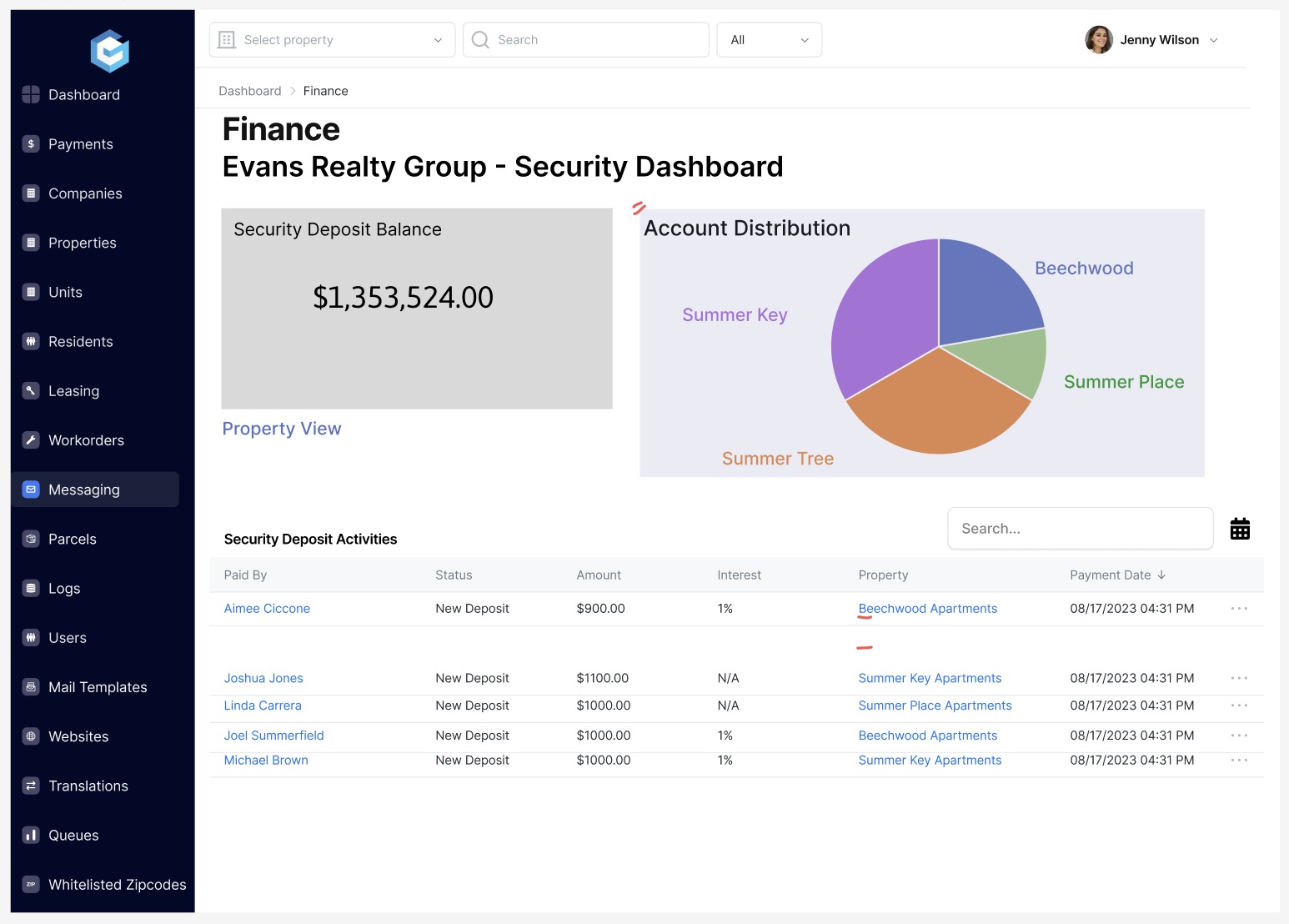
On the resident's side, that same money was invisible: a bill at move-in and a “processing” refund at move-out. The opportunity was to show residents what already existed, their deposit earning, and then let them decide how it comes back.
Design iterations
Before
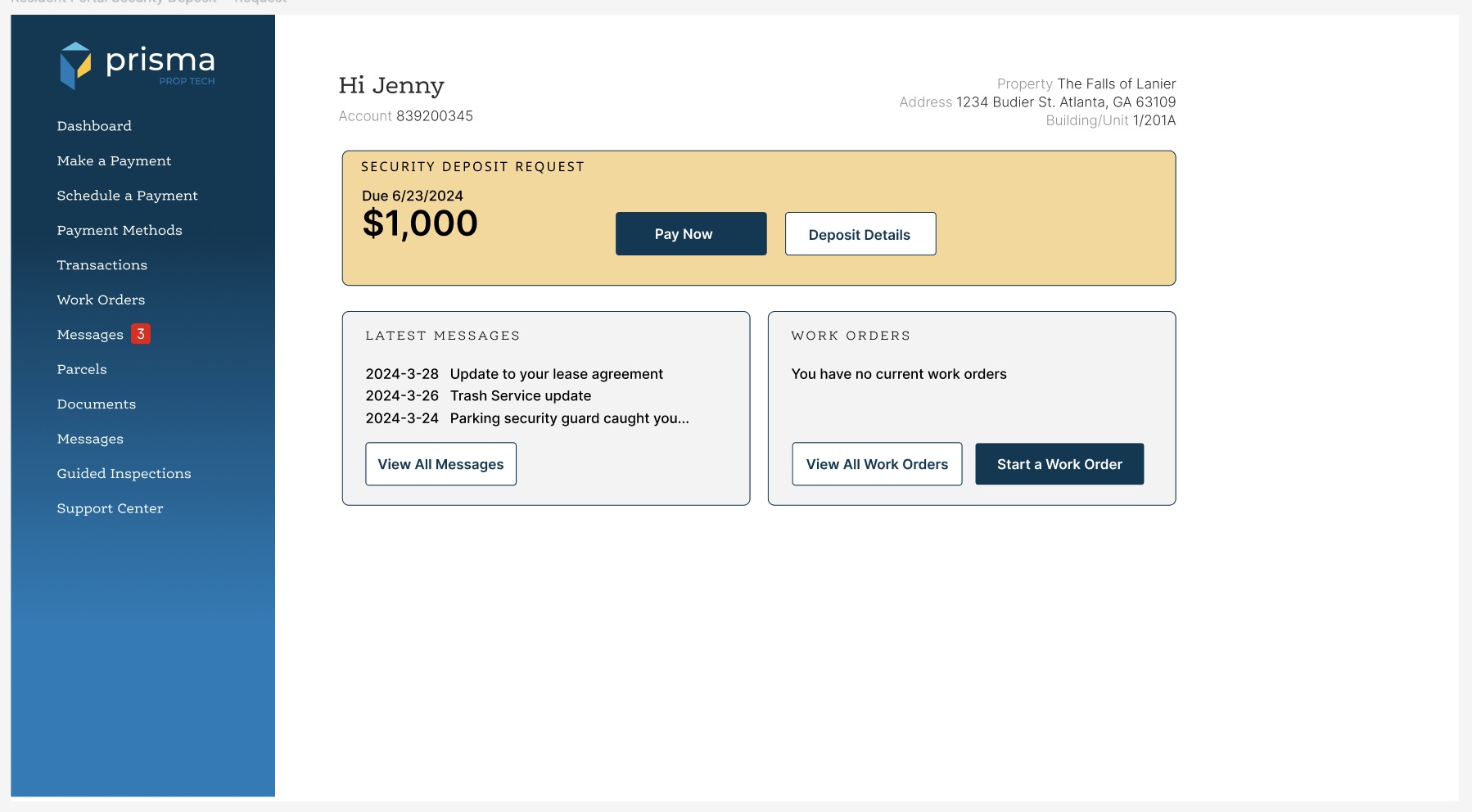
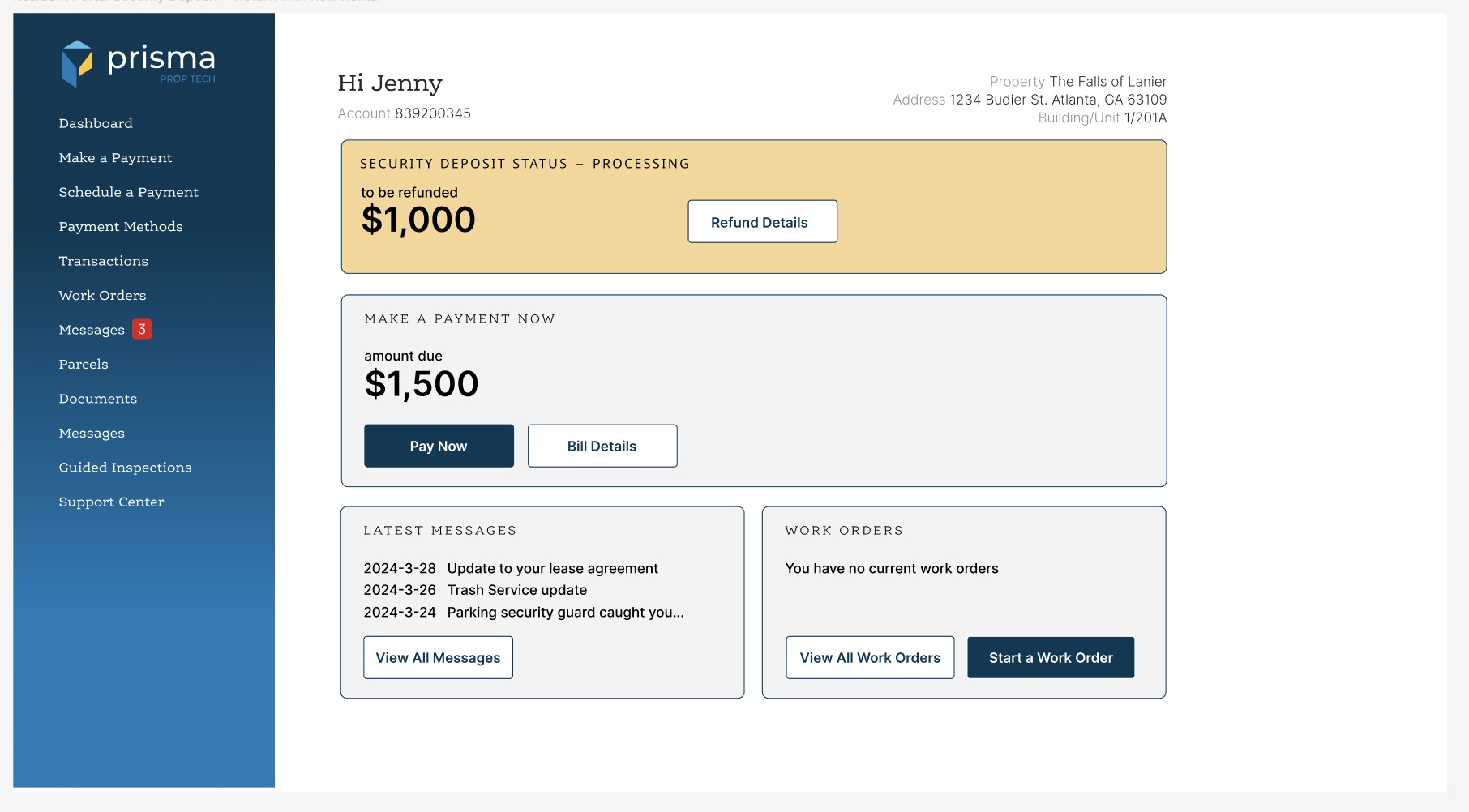
- The deposit is a bill at move-in, then a refund “processing” with no date and no choice.
- No due date on rent, and no record of recent payments.
- Twelve menu items, with Messages listed twice.
After
- When, then how much: “Amount due in 14 days”, with an auto payment reminder.
- The deposit as savings: a refund balance showing “$23 interest gained in last 6 months”, and Request refund.
- Everyday needs up front: maintenance, messages and property information.
- Every payment accounted for: recent transactions by ACH, card, credit or cash.
- Eight menu items, with My Wallet and Rewards added.
Key decisions
- The resident chooses how to be refundedACH, a check to a forwarding address, the wallet, or a Priority debit card. The property manager doesn't have to chase anyone.
- Security deposit as a tab inside My WalletMy proposal at kickoff: one tab for the wallet, one for the deposit, so getting the deposit back is its own clear flow.
- The deposit is shown as a balance, not a billA refund amount with the interest it has gained, so residents can see it working for them.
- The debit card is an offer, not a defaultIt gives same-day access to the money, and a virtual card is available instantly, but it needs enrolment, so the resident always has a choice.
- Refunds are reversals of the original paymentBound to the parent deposit, so every refund is auditable and traces back to where the money came from.
- The deadline is the state's, not oursNo paid fast lane. The manager sees which refunds are due, and gets an email if one isn't processed in time.
Outcome
A security deposit flow built into the resident portal, and rental payment workflows for managers moving $1M to $10M across 100+ properties, on a 730-million-transaction platform. Every movement traces back to its origin, and every refund is an auditable reversal.
Try it yourself
The resident portal is live as the Prisma Resident Portal app, for paying rent, tracking utility charges and raising maintenance requests.
Want more detail?
There's more behind this: the full audit, the move-out flows for the property manager, and the wallet and debit card concepts. Happy to walk you through it.
Ping me for the full walkthrough